

Download Uploader HD – Instagram HD Photo & Video Uploader for Mac
Overview
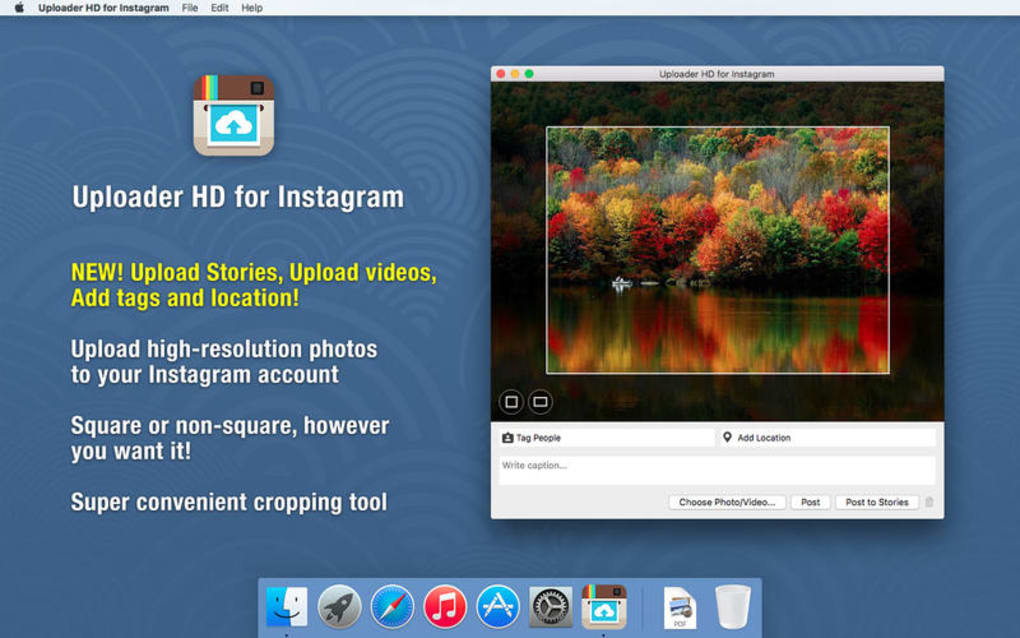
Uploader HD is a dedicated Mac application designed to simplify the process of publishing high‑definition photos, videos, and stories directly to Instagram. Built exclusively for macOS, this full‑version program eliminates the need for work‑arounds such as emulators or browser‑based uploads, giving creators a native, secure, and reliable tool for their visual content. The current release, version 3.0.3, was refreshed on 1 April 2017 and continues to be supported for the latest macOS releases.
Whether you are a social‑media manager, photographer, or influencer, Uploader HD provides a streamlined workflow that respects Instagram’s resolution standards while preserving the original quality of your media. The app’s interface is presented in English and falls under the “Internet → Chat & Communication” category, highlighting its role as a communication‑focused utility rather than a generic image editor. Since its catalog entry in 2016, Uploader HD has attracted a modest but growing user base, with 21 total downloads and a recent surge of five downloads in the last week, indicating a steady interest among Mac‑centric Instagram users.
Key Features & Benefits
- Direct HD upload of photos up to 1080 px width, preserving original resolution.
- Support for Instagram video formats up to 60 seconds, with automatic bitrate optimization.
- One‑click story publishing, including caption, hashtags, and location tagging.
- Secure login via Instagram’s OAuth flow – no password storage on your device.
- Batch upload capability for multiple posts, saving time during content calendars.
- Built‑in preview window that mirrors Instagram’s feed layout for accurate visual checks.
- Automatic update notifications to keep the app aligned with Instagram API changes.
- Lightweight design with a modest memory footprint, ensuring smooth performance on older Macs.
- English‑only interface with clear tooltips, making the learning curve minimal.
- Compliant with macOS security standards, signed with Apple’s notarization service.
Each of these features was crafted with the intent to reduce friction for creators who demand high‑quality visuals without compromising on speed. For example, the batch upload tool allows you to queue an entire week’s worth of posts in minutes, while the preview window guarantees that every image looks exactly as it will on a mobile device. Because the application communicates directly with Instagram’s official API, you avoid the risk of account bans that often accompany third‑party upload hacks. Moreover, the secure OAuth login means your credentials are never stored locally, providing peace of mind for privacy‑concerned users. Together, these capabilities position Uploader HD as a professional‑grade solution for anyone looking to maintain a consistent, high‑resolution Instagram presence from the comfort of a Mac workstation.
Installation, Usage & Compatibility
Step‑by‑Step Installation
- Visit the official download page and click the “Download Uploader HD for macOS” button.
- Once the
.dmgfile finishes downloading, double‑click it to mount the installer. - Drag the Uploader HD icon into your
Applicationsfolder. - Open the application; macOS will prompt you to confirm that you trust the developer. Click “Open”.
- The first‑run wizard will guide you through the Instagram OAuth authentication – simply tap “Log in with Instagram” and follow the on‑screen prompts.
Getting Started with Your First Upload
After logging in, you’ll land on the main dashboard where the “New Post” button is front‑and‑center. Click it, select the HD photo or video you wish to share, and the preview pane will display a live replica of Instagram’s feed. Add your caption, hashtags, and optional location, then hit “Upload”. For stories, the workflow is identical except you choose the “Story” tab, which automatically formats the media to the vertical 9:16 aspect ratio required by Instagram Stories. The application will notify you once the upload is complete, and you can verify the post directly in the Instagram mobile app.
System Requirements & Operating System Support
Uploader HD is optimized for macOS 10.10 (Yosemite) through the current macOS 15 Ventura release. The app runs smoothly on Intel‑based Macs as well as Apple Silicon (M1/M2) devices thanks to Apple’s universal binary packaging. Minimum hardware requirements include 2 GB RAM, 200 MB of free disk space for the application bundle, and an active internet connection for authentication and upload operations. Because the installer size is not publicly disclosed, users should ensure they have a modest amount of free storage to accommodate temporary cache files generated during video transcoding.
The software does not support Windows, Linux, Android, or iOS platforms, reinforcing its niche as a Mac‑only solution. However, the focused development for macOS means you receive a polished UI that adheres to Apple’s Human Interface Guidelines, providing a seamless experience that feels native to the platform.
Pros & Cons
What Users Love
- Native macOS experience with fast, reliable uploads.
- Preserves original HD quality for photos and videos.
- Simple, one‑click story publishing.
- Secure OAuth login, no password storage.
- Batch upload saves time for content calendars.
Areas for Improvement
- No Windows or Linux version – limited to Mac users.
- Interface available only in English.
- Installation size information not disclosed.
- Occasional delay when Instagram API throttles requests.
- Lacks built‑in photo editing tools; users need external editors.
Frequently Asked Questions
Can I upload videos longer than 60 seconds?
Uploader HD adheres to Instagram’s current video length limit of 60 seconds for standard posts. For longer formats such as IGTV, you would need to use Instagram’s native app or another dedicated IGTV uploader.
Is my Instagram password stored on my Mac?
No. Uploader HD uses Instagram’s OAuth authentication, which means your credentials are verified by Instagram’s servers and never saved locally. Only an access token is stored, and it can be revoked at any time from your Instagram account settings.
Does the app work on Apple Silicon Macs?
Yes. The application is distributed as a universal binary, providing native performance on both Intel and Apple Silicon (M1, M2) Macs without requiring Rosetta translation.
Can I schedule posts for future publishing?
Uploader HD currently does not include a built‑in scheduler. You can batch‑prepare your posts and manually upload at the desired time, or combine the tool with macOS automation scripts for limited scheduling.
Is there a free trial available?
The version listed in the catalog is the full, paid edition. However, the developer occasionally offers a 7‑day trial through their official website; check the download page for any promotional offers.
Conclusion & Call to Action
For Mac users who demand a reliable, high‑definition pathway to Instagram, Uploader HD fills a clear niche that many cross‑platform tools overlook. Its native macOS design, secure OAuth authentication, and batch‑upload capabilities make it a strong contender for professionals and hobbyists alike. While the lack of a Windows version and limited language support may deter some, the core functionality delivers exactly what it promises: a fast, secure, and HD‑preserving upload experience.
If you’re ready to streamline your Instagram workflow without compromising image quality, click the download button below, install the app, and start sharing your best content directly from your Mac. Experience the convenience of native uploads and keep your feed looking crisp and vibrant—every single post.
Download Uploader HD NowUploader HD offers a polished native experience for Instagram uploads on macOS. Its strengths lie in preserving HD quality, secure login, and batch processing. The main drawbacks are platform exclusivity and the absence of built‑in scheduling. Overall, it’s a solid choice for creators who work primarily on a Mac.







